
You're great at finding other people's secrets. It's just the job. You pop a box, dump the hashes, screenshot the connection string, grab the AWS key off the CI runner, and move on to the next host. By the end of an engagement you've built a folder, maybe two hundred PNGs, documenting every credential you touched.
Now answer honestly: where is that folder right now?
If you're like many operators, it's on your laptop's Desktop or Screenshots folder. Some of it is pasted in the team Notion. A few shots went into the draft report. iCloud or OneDrive just might be syncing the whole thing to a cloud. Every one of those images is a live credential sitting in cleartext.
During the engagement, you were the attacker. And now you're a great target. You spend weeks concentrating an organization's most sensitive secrets into one place: domain hashes, cloud keys, database strings, bearer tokens, all sitting on your laptop. If someone pops you, they skip the hard part since you already did the collection for them.
What screenscrub does
We built a small thing to help. It's called screenscrub, it's MIT-licensed, and it does one job: find the credentials in your screenshots, hand them to your secret manager, and redact them out of the images for good.
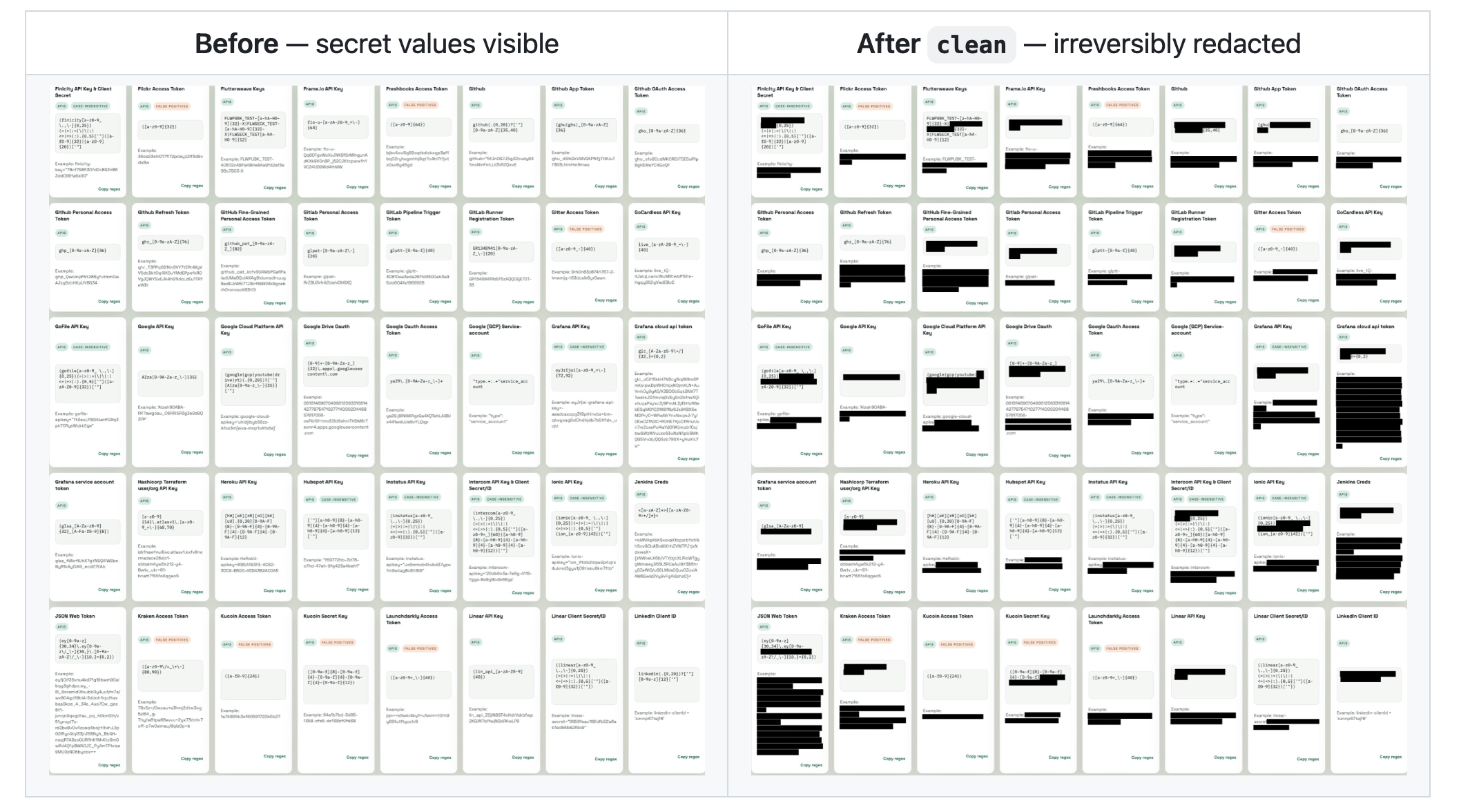
The redaction is the part worth explaining. screenscrub doesn't draw a black box on a layer you can remove, and it doesn't crop the original file in place. That's actually the mistake behind aCropalypse, where "redacted" phone screenshots turned out to be fully recoverable. Instead it decodes the image down to raw pixels, paints opaque rectangles over the secret regions, and re-encodes a brand-new PNG. There is nothing underneath to recover, and the EXIF and text-chunk metadata get dropped along the way. Then it re-runs OCR on its own output and refuses to file the original away until the secret is genuinely unreadable.
Detection is tuned for the screenshots you take during ops. It carries the usual gitleaks patterns (AKIA keys, ghp_ tokens, JWTs, PEM blocks), plus a red-team pack for the stuff that shows up in our screenshots and nobody else's: NetNTLMv2 and pwdump hashes, /etc/shadow lines, PuTTY and OpenSSH private keys, HTTP Basic and Bearer headers, postgres:// connection strings. The secrets go into whichever store you already use: an age-encrypted file, 1Password, KeePassXC, or the macOS Keychain. Then the original moves into an encrypted quarantine, so a bad redaction is recoverable if you want instead of gone forever.
Thinking still required
This is a safety net, not a guarantee. OCR misses text all sorts: low-contrast terminals, rotated captures, tiny or stylized fonts. What OCR can't read, screenscrub can't redact. Detection only knows the shapes it's been taught, so a secret in a novel format walks right through.
The tool is deliberately biased toward recall. It over-flags on purpose, because a credential left in an image is the worser outcome and a false positive costs you nothing but a black rectangle losing some context. It will never tell you an image is "guaranteed clean." Run it, then still look at your images with your own eyes.
Why we're shipping this
Adversis does security consulting. We try to find secrets. A screenshot scrubber is the same question pointed at your own laptop. A domain hash in a PNG on a synced Desktop is a credential an attacker gets for free. No exploit, no phishing, no lateral movement, just read the file. That's about as much blast radius as a single credential can have, and it's entirely self-inflicted.
We think about this stuff for a living and still forget to clean up our own screenshots. The obvious hygiene is the hygiene nobody has time for on the last day of a test. Automate it, and stop relying on future-you to remember.
Go
It's one binary (you'll need tesseract on your PATH for the OCR). It runs offline by default: no network, no telemetry. The last thing you want is your engagement secrets phoning home. Point it at your screenshots, let it quarantine the originals encrypted, and gate your deliverable with screenscrub verify, which fails if it can still read a known secret in the folder, so a bad redaction can't ship to the client by accident.
screenscrub ~/Desktop         # scan, redact, and file the secrets away
screenscrub verify ./report   # fails if a known secret is still readable
Go break things. Just don't leave the keys on your Desktop when you're done.
https://github.com/Adversis/screenscrub
.jpg)