

Who tells you when a Microsoft 365 account is compromised?
An attacker can steal an authenticated Microsoft 365 session without triggering another MFA prompt. From the company's perspective, someone with a valid session is just logging in and doing ordinary things like reading email.
How long would it take your organization to notice?
For a company with a dedicated security operations team, there's probably a reasonable answer to that question. For a 50-person company where security is one of several responsibilities assigned to an engineer, the answer is less obvious, especially with a remote workforce.
Microsoft does have lots of useful security telemetry. But making use of it is a separate problem, particularly when you have limited people, time, and budget, and that telemetry is paywalled behind their top tier licensing.
We built a tool to address this: M365 Account Takeover Monitor. It's open source, runs in your own Azure subscription, and costs about $1.50 a month in Azure infrastructure. It has served us and our clients well.
What happens after someone logs in?
Much of the effort organizations put into identity security goes toward preventing unauthorized access. MFA, conditional access, password managers, and device management are all worthwhile investments.
But it's also worth considering what an attacker would do with an account once they have access.
A finance employee's mailbox contains invoices, payment details, and conversations with vendors. A salesperson's account contains customer relationships and contracts. An engineer's account might contain password reset emails for other systems.
An attacker with access to any of these accounts has considerable information to work with, along with an established identity that other people trust.
They might create an inbox rule to hide replies to fraudulent payment requests, forward sensitive emails to an external address, or register another authentication method to retain access.
Not to mention increasingly sophisticated phishing email kits steal credentials, MFA tokens, and session cookies. These are often replayed from known cloud providers, VPNs, or malicious IP addresses.
All of these activities leave evidence in Microsoft's audit logs. The question is typically whether anyone sees it in time to do something about it.
How much monitoring do you actually need?
The conventional answer is to collect your logs into a centralized security platform, write detection rules, and have someone investigate the resulting alerts.
That's a reasonable approach if you have the resources to operate it.
Smaller organizations have to make different trade-offs. The person responsible for investigating an unusual login might also be responsible for deploying the next product release. Collecting more security data doesn't necessarily make that person's job easier.
We like approaching these problems from the other direction: start with a handful of events that would genuinely concern you and work backward.
What would you want to know about?
- An authenticated session being used from two different countries
- Someone logging in from an AWS EC2 instance or other hosting provider
- Someone creating an inbox rule that hides emails about payments or security
- An application receiving permission to read employee mailboxes
- A new MFA method registered following a suspicious sign-in
- Someone disabling security protections or granting administrative privileges
None of these is definitive proof of compromise. But each could be worth investigating, particularly in combination with other unusual activity.
M365 Account Takeover Monitor
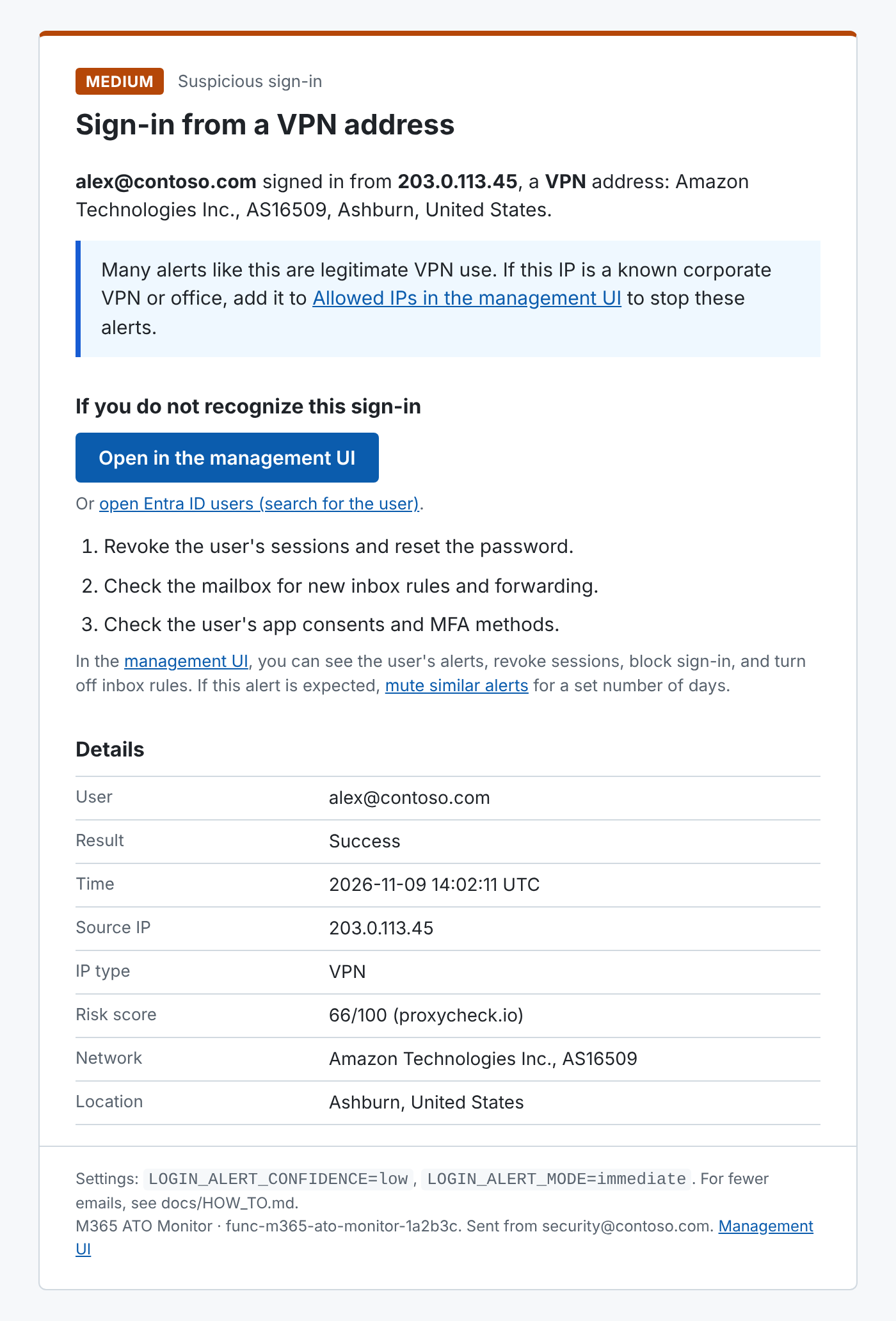
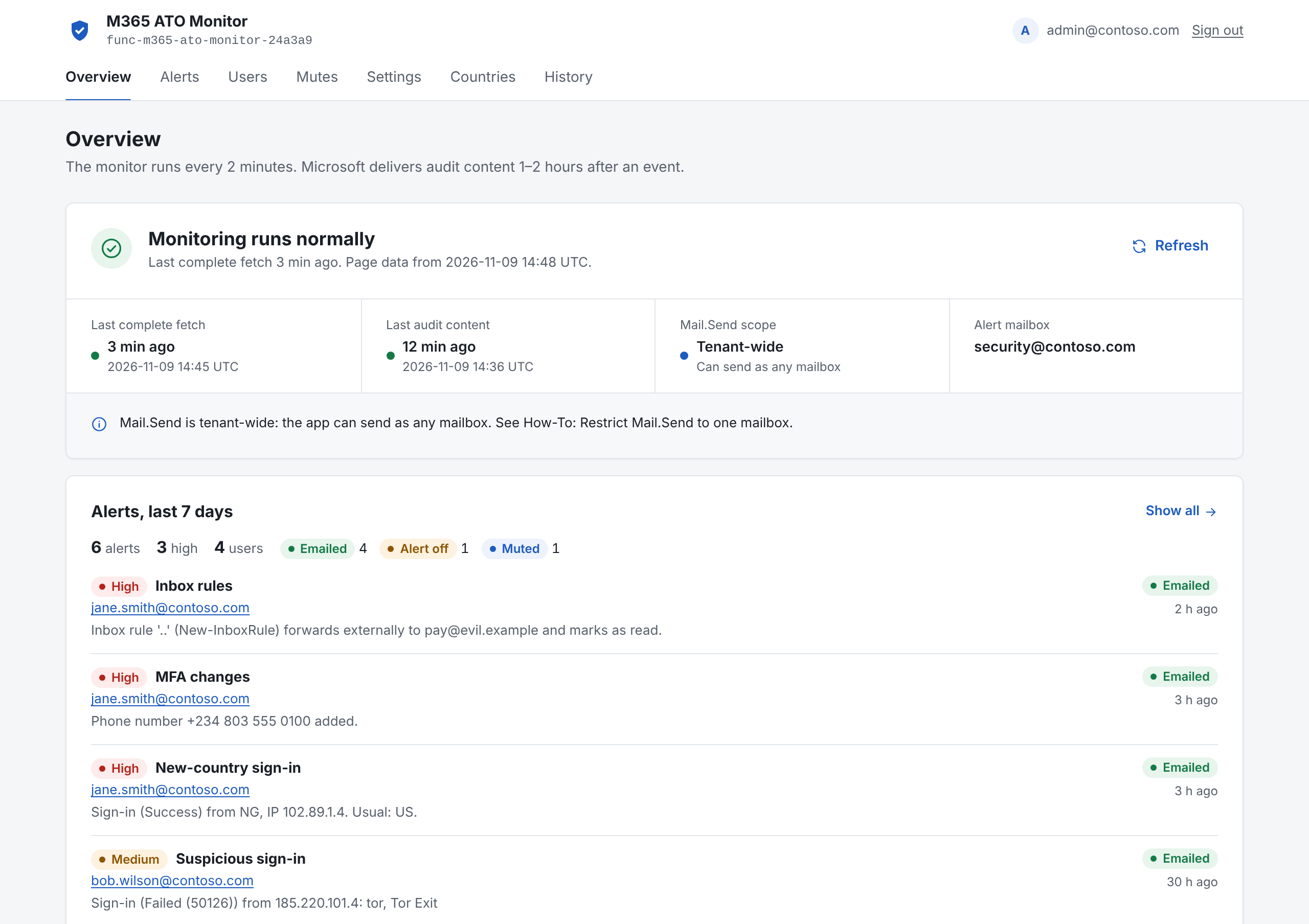
The monitor runs as an Azure Function, checking Microsoft's unified audit log every two minutes. It uses a managed identity, incorporates IP reputation data, and learns which countries users normally sign in from.
When it finds something suspicious, it sends an email with investigation steps and related findings from the previous 24 hours. A web interface lets you investigate accounts, review alerts, and check the health of the deployment.
You can also configure automatic responses, such as revoking sessions, blocking sign-ins, or disabling malicious inbox rules but these are off by default.
The tool doesn't require Entra ID P2 or Defender licenses. It is released under the MIT license, and has routinley cost less than a few dollars a month.
There are limitations. Microsoft can take hours to publish some audit records, so checking every two minutes doesn't guarantee immediate detection. An attacker using a residential IP address in the same country as the victim could also go unnoticed, as would one proxying their activity through the user's compromised endpoint.
If you've already invested in a security monitoring platform that adequately covers account takeover, you may not need this tool. But it's probably cheaper.
Someone should still answer alerts
Before deploying any monitoring tool, it's worth answering a few questions.
- Who receives the alert?
- Do they have the permissions and knowledge to investigate it?
- Can they determine what the attacker accessed?
Microsoft has a useful guide to responding to compromised accounts that can serve as the basis for a simple internal response procedure. Review those and be ready to run the tools. Make sure someone else knows how to follow it when the primary person is unavailable.
That work is arguably as important as deploying the monitoring itself.
Build security for the organization you have
Much of our consulting work at Adversis involves helping growing software companies make security decisions under constraints. They have products to ship, customers to support, and finite engineering resources.
Part of building a good security program is figuring out which problems deserve sophisticated solutions and which can be addressed with something simpler.
Account takeover monitoring is a useful example. Start with a specific threat, identify the evidence it leaves behind, and build a process around responding to it.
You don't need to replicate the security operations of a Fortune 500 company to make meaningful improvements to your security.
But you do need to be deliberate about what you're protecting, what you're watching, and what you'll do when something goes wrong.
M365 Account Takeover Monitor is available on GitHub, along with installation instructions, detection logic, and investigation guides.